Month-end close for small finance teams: a checklist that holds up
A seven-step close for teams where one or two people do the books: post everything, reconcile the banks, check receivables, payables and tax, adjust, review, and close the period.

In a small business, the month-end close is usually one person, a checklist and a spreadsheet. It gets done, but rarely in the same order twice, and the numbers have a way of changing after someone has already looked at them.
A good close has two properties: it follows the same steps every month, and once it is done, the figures for that month stop moving. Here is the order we recommend for Modulix, where most entries post themselves and the close is mostly about checking.
1. Make sure everything is posted
Sales invoices, customer payments, approved vendor bills, bank lines, expense claims and tax returns post to the ledger automatically. Your first job is to make sure nothing is still sitting in a draft:
- Issue the invoices for orders delivered this month.
- Approve the vendor bills you received for the month.
- Decide on the expense claims that were submitted.
- Post or delete journal entries that are still drafts. A period cannot be closed while a draft is dated in it.
Then open Receivables and look at the Postings tab. If a document could not be posted, for example because its period was already closed or an exchange rate was missing, it is listed there with the reason. Fix the cause and select Post what is missing.
2. Reconcile every bank account
Import each account's statement up to the last day of the month, match the remaining lines and reconcile with the bank's closing balance. Modulix only lets you reconcile when the difference is zero and nothing is left to match, which is exactly the check you want. We wrote a separate article on bank reconciliation.
3. Review receivables and payables
Run the receivables aging as of the last day of the month. Because payments and credit notes dated later are left out, you can reproduce the same report next week and get the same answer. On the Balances tab, compare each customer's Owed amount with In the books: a difference in your own currency usually means a document did not post.
Do the same for payables: check the aging, and make sure every bill you have paid shows as paid.
4. Check the taxes
On Tax returns, the Collected vs. paid tab shows the tax on your sales and purchases by month or quarter. If you file for this period, prepare the return now. A draft return reads live figures from the ledger, so it stays right as long as the period is open.
5. Record accruals and adjustments
Some entries never come from a document: accrued salaries, depreciation, prepaid expenses. Record them as journal entries. If two people share the books, use the permissions to your advantage: give the bookkeeper the right to draft entries and keep the right to post them for the person who reviews.
Remember that posted entries are never edited. If something is wrong, reverse it and post the correct entry. Both stay in the books, which is what an auditor wants to see.
6. Review the statements
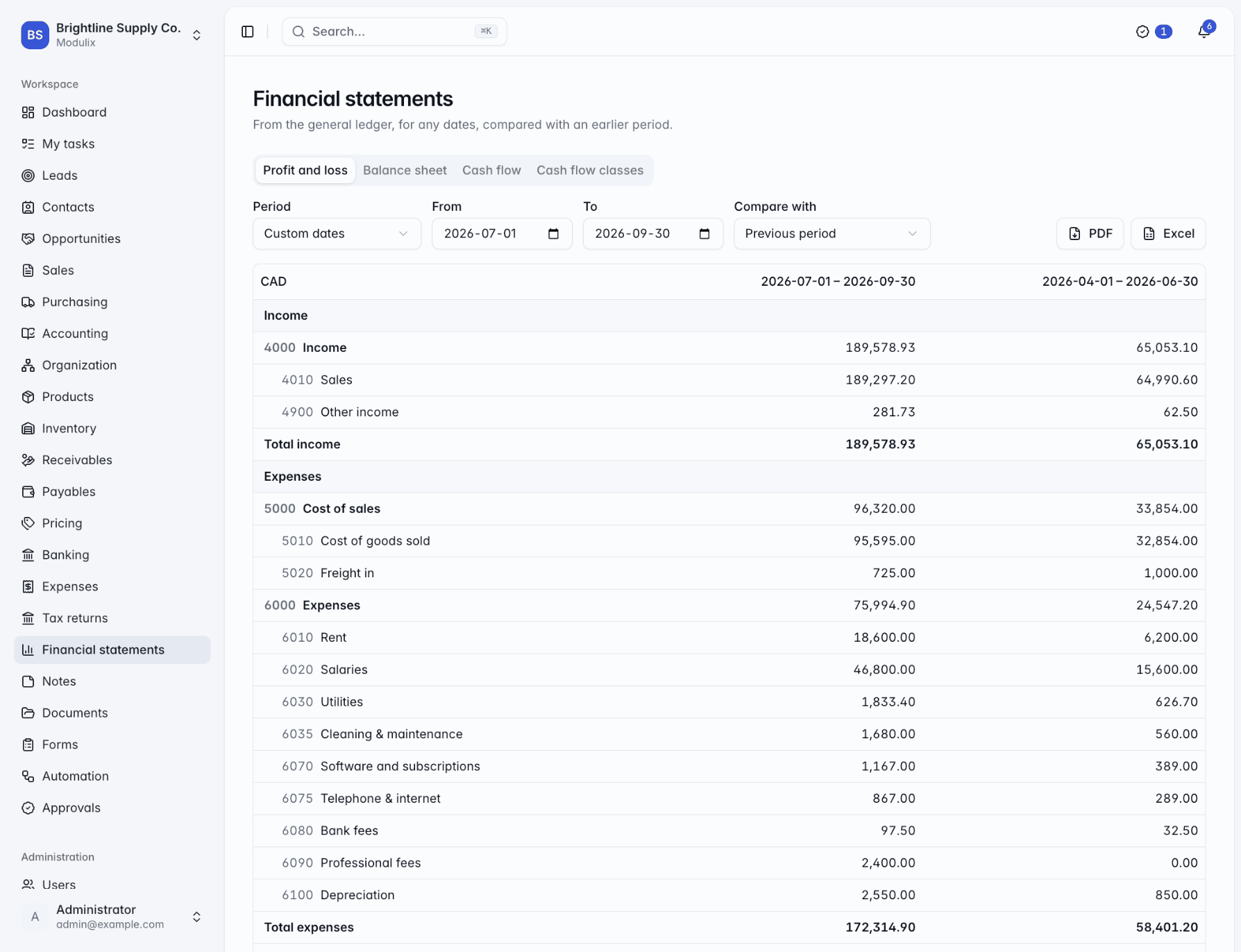
Start with the Trial balance for the month and check the badge that says debits equal credits. Then open Financial statements: the profit and loss compared with the previous period, the balance sheet at month-end and the cash flow statement. Large swings compared with last month deserve a look before anyone else sees them. Download them as PDF for the management pack, or as Excel if you need to work with them further.
7. Close the period
On Accounting → Periods, close the month. Modulix only allows it when every earlier period is closed and no draft entry is dated in the month, and from then on nothing can be posted into it, including automatic entries. If you need to correct something later, reopen periods from the most recent one backwards, then close them again.
Once the year-end accounts are filed, lock the periods of that year. Locked periods can never be reopened.
The first close in a new system always takes longer. By the third month, most teams find that steps 1 to 3 are mostly confirming what is already there, and the time goes into reviewing the numbers rather than producing them.
- month-end
- general ledger
- checklist
Related resources
 BlogFinance & accounting
Bank reconciliation without spreadsheets
Import the statement, let the obvious matches happen, deal with the rest in one dialog, and reconcile only when the difference is zero. How bank reconciliation works in Modulix.
5 min BlogFinance & accounting
GST/HST returns straight from the ledger
Set up tax rules once, let invoices, bills and expense claims post their tax, and prepare the GST/HST return from the ledger. What Modulix does, and what stays with you.
5 min