Quote to cash in one system: where the hand-offs break
Most sales errors happen between tools: a price re-typed, stock promised twice, an invoice that does not match the order. How keeping the whole flow in one system removes the gaps.

Ask a growing business where its sales errors come from and the answer is rarely "the salesperson". It is the hand-offs: from the CRM to the quote, from the quote to the order, from the order to the warehouse, from the warehouse to the invoice, and from the invoice to the books. Every time information is copied from one tool to another, it can be copied wrong.
The usual failure points
- The price. The quote was built from last year's price list, or from a discount the salesperson was not supposed to give.
- The stock. Two orders were promised the same items, because nobody could see what was already reserved.
- The order. The order was re-typed from the accepted quote, and one line changed on the way.
- The invoice. It was issued before the goods shipped, or for the wrong quantities after a partial delivery.
- The payment. It arrived in the bank and was matched to the wrong invoice, or to none.
The same flow, without copying
In Modulix, each step is created from the one before and copies its customer, lines and prices:
- A qualified lead is converted into a contact, a company and, if you choose, an opportunity with product lines.
- A quotation created from the opportunity takes its customer, contact, currency and lines. Prices come from your price books and discount rules; taxes come from your tax rules.
- When the customer accepts, Create the order turns the quotation into a sales order with the lines exactly as accepted.
- Confirm reserves the stocked lines in the order's warehouse, as far as stock allows, and warns you about any shortage.
- Deliver ships what you have, in one shipment or several. Each delivery writes stock movements.
- Invoice bills all of the order or part of it. Discounts agreed on the order are kept and not checked again.
- Issue gives the invoice its final, gap-free number. A customer payment is applied to it and its balance updates.
- With the finance modules on, the invoice and payment post to the ledger as they happen, and the payment is matched on the bank statement.
Guardrails that do not get in the way
Keeping everything in one system is only half of it. The other half is rules that apply automatically:
- Discount limits per role. A discount someone types on a line is checked against the limit for their role. Discounts that come from your own discount rules are not, because you already approved them.
- Price check. Anyone can see how a price was reached for a customer, a day and a quantity: which price book, which discount, and the result.
- Locked documents. Confirmed orders and issued invoices cannot be edited. Corrections go through credit notes, so the history stays readable.
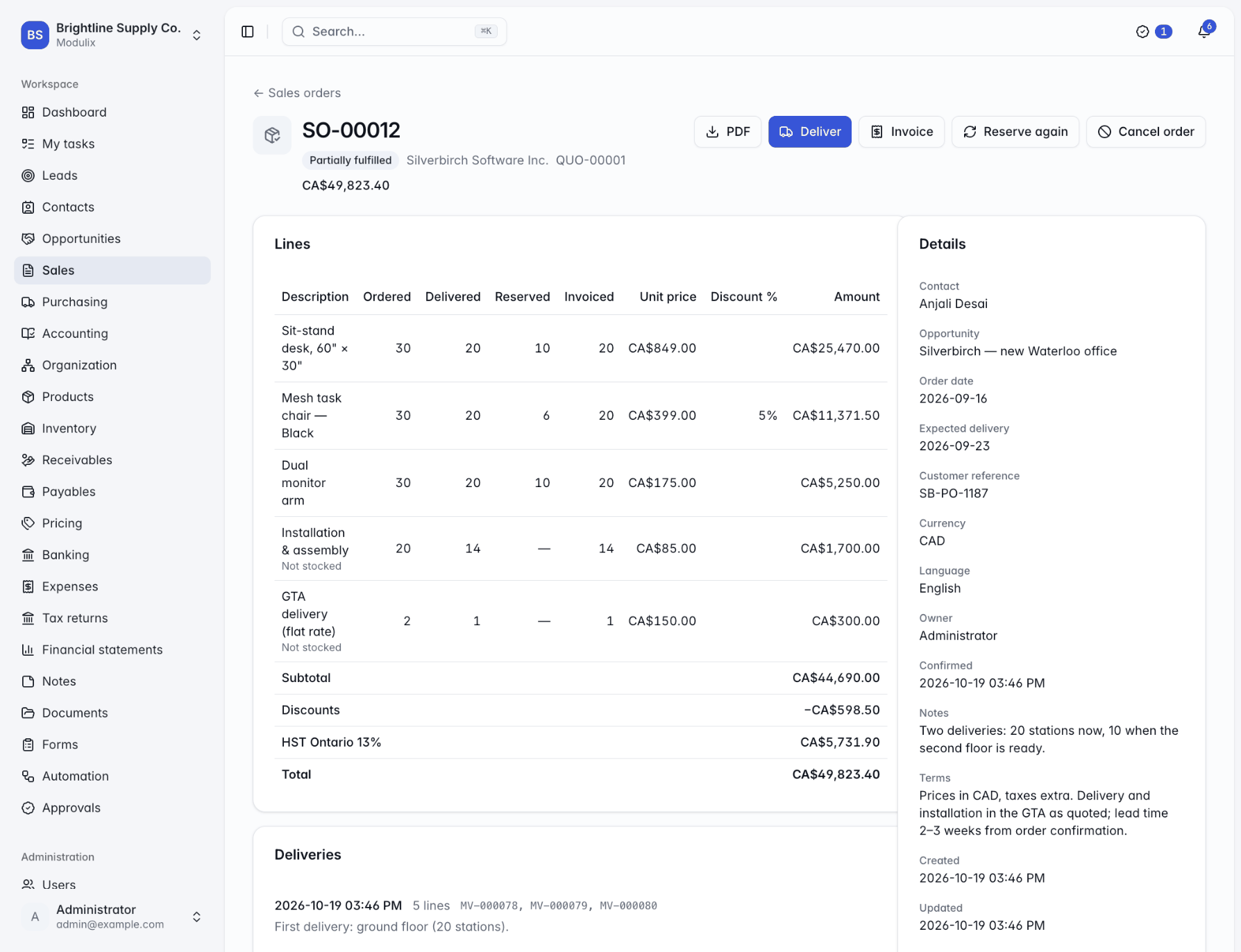
- Order status at a glance. Each order line shows ordered, delivered, reserved and invoiced quantities, so "what is left to ship?" and "what is left to bill?" have one answer.
You can start at any step
Not every sale begins with a lead. A quotation does not need an opportunity, an order does not need a quotation, and an invoice does not need an order. Walk-in orders, repeat orders and one-off charges all fit, without breaking the chain for the sales that do follow every step.
The result is not a faster salesperson. It is fewer corrections, fewer credit notes, and month-end figures that already agree with what happened.
- sales
- invoicing
- pricing
Related resources
 White paperPlatform & IT
Choosing modules: start small, grow without migrations
Which Modulix modules to turn on first, what each one brings with it, and how to add the ledger, purchasing or automation later without moving any data.
8 min BlogFinance & accounting
Month-end close for small finance teams: a checklist that holds up
A seven-step close for teams where one or two people do the books: post everything, reconcile the banks, check receivables, payables and tax, adjust, review, and close the period.
6 min